
MyWoo Geolocation Confuguration
MyWoo Multi Currency 3.0 uses WooCommerce geolocation to map visitor countries to the correct currency and regional pricing rules.
The Geolocation Rules section allows you to create region-based currency rules, assign countries to each rule, choose the display currency, and decide whether exchange rates should be updated automatically or controlled manually.
Geolocation Rules Overview
With Geolocation Rules, you can:
- Create custom regional pricing rules by country
- Assign one or multiple countries to a rule
- Select which currency should be shown for visitors from those countries
- Use auto update mode for live exchange rates, or keep values manually controlled
- Refresh exchange rates directly from the rule editor when needed
- See provider source, last update time, and rate status for better confidence
How to Configure Geolocation Rules
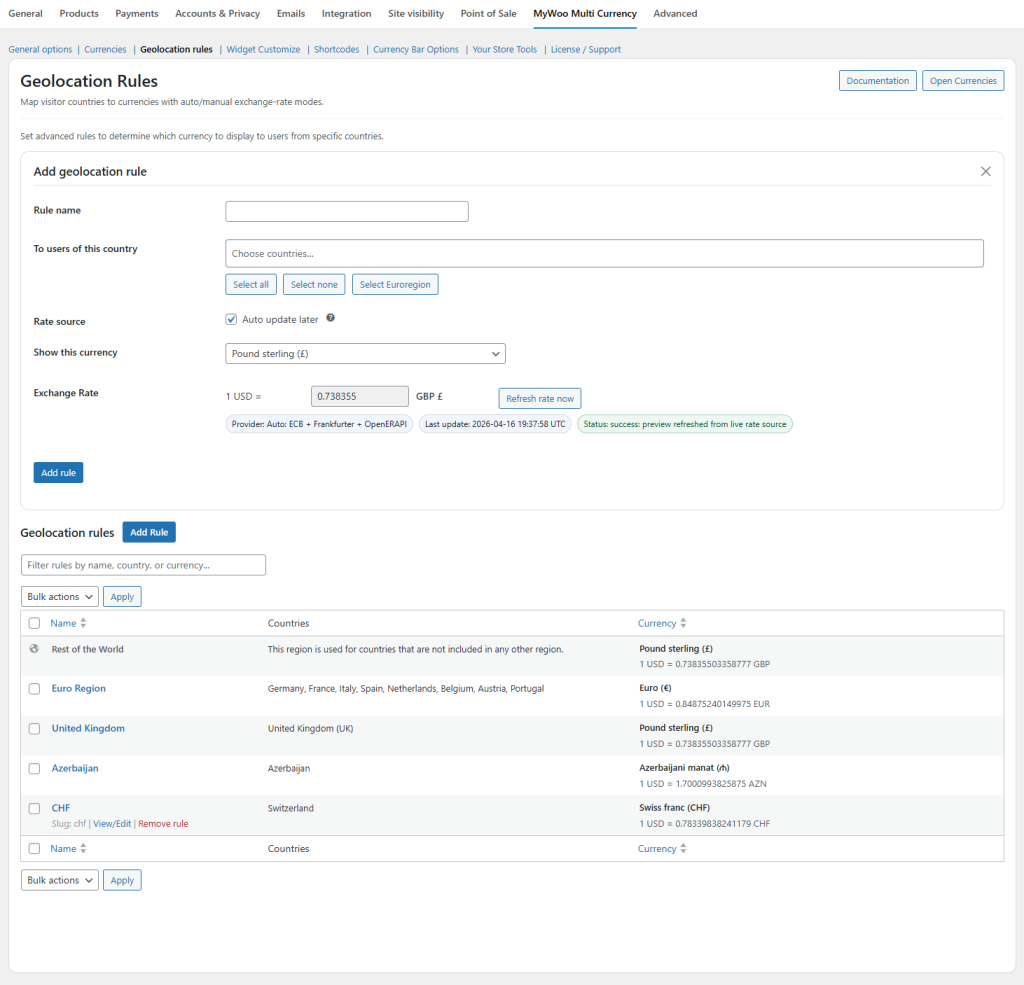
To configure country-based currency rules:
- Go to WooCommerce → Settings → MyWoo Multi Currency → Geolocation Rules
- Click Add geolocation rule
- Enter a Rule name
- Select one or more countries in To users of this country
- Choose the target currency in Show this currency
- Enable or disable Auto update later depending on whether you want live rates or manual control
- Use Refresh rate now when you want to fetch the latest rate immediately
Each rule can be managed from the rule list below the editor, where you can review countries, currency, and applied exchange rates.
Auto and Manual Exchange Rate Modes
- Automatic mode uses the configured provider chain to refresh the exchange rate for the selected currency.
- Manual mode allows you to keep your own custom exchange rate values for business-specific pricing strategies.
- The rule editor can display the active provider source, the last successful refresh time, and a status message.
- This makes it easier to verify that your pricing is using a valid and recently updated rate.
Default Customer Location
For geolocation-based currency switching to work correctly, WooCommerce must be configured to detect the customer location.
Go to WooCommerce → Settings → General and set Default customer location to one of the following:
- Geolocate, or
- Geolocate (with page caching support) if your website uses full-page caching.
The caching-support option uses an AJAX-based method and may append a temporary parameter to the page URL. This is normal and helps prevent cached prices from being shown to the wrong visitors.
Country Coverage and Fallback Logic
MyWoo Multi Currency 3.0 supports rule-based country mapping and fallback behavior.
- You can create rules for individual countries or grouped regional markets
- If a detected country is not included in an existing rule, fallback behavior can be applied depending on your store configuration
- This helps prevent undefined country states and keeps currency selection more predictable for international traffic
- The rules table makes it easier to review all active country-to-currency mappings in one place
Provider and Status Information
Inside the Geolocation Rule editor, version 3.0 can display useful operational information such as:
- Current provider source
- Last update timestamp
- Rate refresh status
- Current exchange value preview
These details help merchants validate their pricing logic and quickly understand whether live-rate updates are working correctly.
Important Notes
- Geolocation-based currency detection depends on WooCommerce geolocation being enabled and working correctly on the hosting environment.
- If you use aggressive caching, always test with Geolocate (with page caching support).
- Multi-currency checkout behavior may also depend on the payment gateway used on your store.
- After changing geolocation, region rules, or exchange-rate settings, clear cache before testing the storefront.