
MyWoo Multi Currency

  • About Plugin
    • Plugin features
    • Plugin Screenshot
  • Documentation
    • Plugin Screenshot
    • Minimum requirements
    • Installing Plugin
    • MyWoo Geolocation Confuguration
    • Cache support on Geolocation
    • General Settings
    • Setup Regions
    • Testing
    • Currency Switcher Widgets
    • Currency Bar Options
    • Shortcode Configuration
  • Live Shop Test
  • Cart
  • Checkout
BUYNOW
  • Home
  • Documentation
  • Installing Plugin
 

Installing Plugin

Installing Plugin

Before installation MyWoo Multi Currency please take a moment to review the minimum requirements .

However you must have already install WooCommerce plugin. If you do not know how to install it, you can read at WooCommerce documentation.

Get zip file

To install the MyWoo Multi Currency from the zip file:

1. Download MyWoo Multi Currency by clicking on Download page after buying at Codecanyon.net .

2. In your WordPress admin, go to Plugins → Add New.

3. Click Upload Plugin.
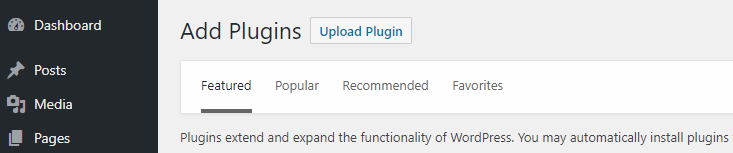
4.  Browse and select the zip file that you already downloaded from your CodeCanyon download page.
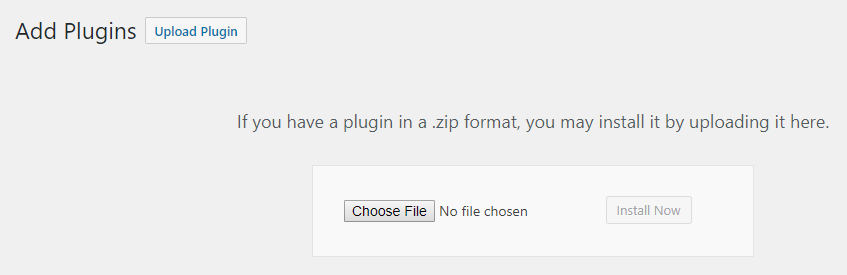
plugin-upload2

5. Click Install Now.

6. If it’s done successfully, then click Activate Plugin to activate it.

Documentation

  • Minimum requirements
  • Installing Plugin
  • MyWoo Geolocation Confuguration
  • Cache support on Geolocation
  • General Settings
  • Setup Regions
  • Testing
  • Currency Switcher Widgets
  • Currency Bar Options

Get MyWoo Multi Currency for WooCommerce Now

Buy and install it in a few minutes.

BUY IT NOW

My Woo Multi Currency is the premium plugin which works with WooCommerce and integrate it multi currency payment module.

All rights reserved. - © - 2018

SHORT LINKS

  • Home
  • About plugin
  • Documentation

  • Cart
  • Checkout
  • Buy it NOW

WE'RE SOCIAL

TOP