
Shortcode Configuration
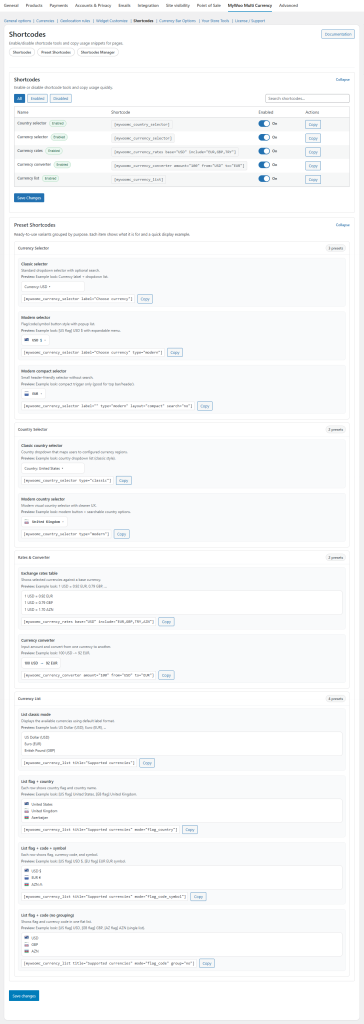
MyWoo Multi Currency 3.0 includes flexible shortcode and WPBakery-ready element support, so you can place currency tools exactly where you need them.
These tools can be used in pages, landing sections, custom content layouts, builder-based designs, widget-ready areas, and other storefront placements where you want more control over how currency tools are displayed.
Shortcodes & WPBakery Elements Overview
With MyWoo Multi Currency 3.0, you can place:
- Country Selector
- Currency Selector
- Currency Converter
- Currency Rates
- Currency List
This gives merchants more flexibility than relying only on widgets or default placement options.
Country Selector Shortcode
Use the Country Selector shortcode when you want visitors to choose their country manually.
This is especially useful for international stores that want to give customers direct control over region-based currency behavior.
Example shortcode
Main arguments
array(

'other_countries_text' => 'Other countries',

'title' => '',

)
Currency & Country Selector Demo
Currency Selector
Modern and Classic display styles can be used depending on the storefront design.
Country Selector
Country selector tools can also be placed in modern or classic layout mode.
Country Selector
Country Selector
Currency Converter Shortcode
Use the Currency Converter shortcode to show a converter tool on pages where visitors may want to compare values before purchase.
This is useful for landing pages, product support pages, pricing pages, or international help sections.
Example shortcode
[mywoomc_converter]
Currency Converter Demo
Currency Converter v1
Currency converter v1
Converted: 0 GBP
Currency converter v1
Converted: 0 GBP
Currency Converter v2
Currency converter v2
Currency converter v2
Currency Rates Shortcode
Use the Currency Rates shortcode when you want to display exchange-rate information directly on the storefront.
This can be used in support pages, FAQ pages, international pricing sections, or custom rate panels.
Example shortcode
[mywoomc_rates]
Currency Rates Demo
Currency Rates (Classic)
Currency rates (classic)
| Currency | 1 USD = |
|---|---|
| EUR - Euro | 0.878966 EUR |
| GBP - Pound sterling | 0.750532 GBP |
| CNY - Chinese yuan | 6.772172 CNY |
| CHF - Swiss franc | 0.817614 CHF |
| TRY - Turkish lira | 47.345346 TRY |
| RUB - Russian ruble | 78.268914 RUB |
Currency Rates (Modern)
Currency rates (modern)
- 0.878966 EUR
- 0.750532 GBP
- 6.772172 CNY
- 0.817614 CHF
- 47.345346 TRY
- 78.268914 RUB
Currency List Shortcode
Use the Currency List shortcode when you want to display available currencies in list form.
Depending on your plugin configuration, list outputs may use different display styles such as classic lists, flag-based layouts, code-based layouts, label cards, or searchable select-box presentations.
Example shortcode
Currency List Demo
Classic
Currencies list (classic)
Flag + Country
Currencies list (Flag + Country)
Country Selector Preview
Shortcode Placement Ideas
You can use MyWoo Multi Currency shortcodes and WPBakery elements in many places, including:
- Pages and posts
- WPBakery Page Builder layouts
- Custom WooCommerce landing sections
- Theme shortcode blocks
- Text widgets or shortcode-ready widget areas
- Help, FAQ, and pricing information pages
This makes shortcodes and builder elements one of the most flexible ways to deploy currency tools across the store.
Shortcode Notes
- Some outputs depend on your active plugin settings and enabled display modes.
- For regional behavior, make sure your geolocation rules are configured before testing output.
- For multilingual stores, shortcode usage can be combined with WPML-ready workflows.
- For builder-based designs, these elements can be placed directly inside WPBakery content blocks.