
MyWoo Multi Currency

  • Home
  • About plugin
    • Plugin features
    • Plugin Screenshot
  • Documentation
    • Plugin Screenshot
    • Minimum requirements
    • Installing Plugin
    • W.C. Geolocation Confuguration
    • Cache support on Geolocation
    • General Settings
    • Setup Regions
    • Testing
    • Currency Switcher Widgets
    • Currency Bar Options
    • Shortcodes
  • Live Shop Test
  • Cart
  • Checkout
BUYNOW
  • Home
  • Documentation
  • Cache support on Geolocation
 

Cache support on Geolocation

Cache support on Geolocation

If you are not using a cache system, you can skip this section.

Cache problem and the geolocation

We’re explaining with an example of the problem. Because of geolocation is powered by a WooCommerce PHP script which won’t run on cached pages. This can be confusing to customers. :

1 . Fred from Germany visits the store and looks at a product.

2. Fred sees the products with EUR (German price).

3. Site’s cache system saves the page in the cache.

4. Oliver opened site from the UK and want to see the same products at the store .

5. As the page is cached, Oliver sees German prices, rather than UK prices.

To solve this issue you have two options:

  • Enable the option Load products price in background (recommended).
  • Set the WooCommerce option Default Customer Location to Geolocate with page caching support.

Load products price in background

If you enable this option, MyWoo Multi Currency fires an AJAX request on each page to refresh prices dynamically.

To enable it go to WooCommerce → Settings → MyWoo Multi Currency → General options and select Load products price in background.
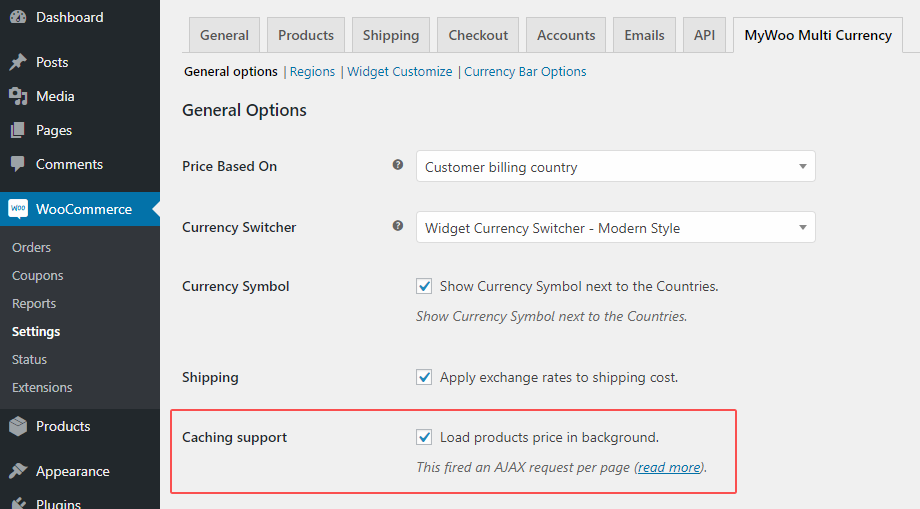
caching-support

You must manually clear the cache of your cache plugin and your hosting provider after enabled Load products price in background.

Load products price in background supports default WooCommerce product types (Simple, Virtual, Downloadable, External, Grouped and Variable) and WooCommerce Subscriptions, WooCommerce Product Bundles, WooCommerce Product Add-ons and WooCommerce Bookings.

Currently, this option does not support WooCommerce Composite Products, if you are using this type of product you have to enable WooCommerce Geolocate with page caching support.

WooCommerce Geolocate with page caching support

Since version 2.4, WooCommerce adds an option to set the user’s location called “Geolocation with page caching support”. When you activate this option WooCommerce fires a javascript redirection with an extra parameter v=xxxxx. This parameter causes cache invalidation, the new page (with the parameter) will cache separately.
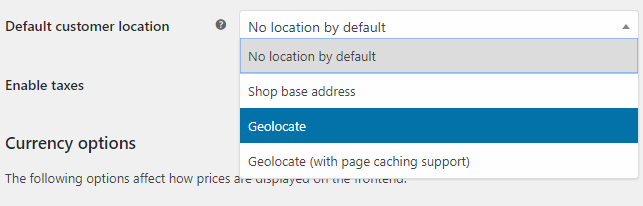

customerlocation

You must manually clear the cache of your cache plugin and your hosting provider after set Geolocate with page caching support.

See also

  • Configuring caching plugins in WooCommerce docs
  • What does Cloudflare IP Geolocation do?
  • Pages Aren’t Cached When WooCommerce Geolocation Enabled at WPRocket

Documentation

  • Plugin Screenshot
  • Minimum requirements
  • Installing Plugin
  • W.C. Geolocation Confuguration
  • Cache support on Geolocation
  • General Settings
  • Setup Regions
  • Testing
  • Currency Switcher Widgets
  • Currency Bar Options
  • Shortcodes

Get MyWoo Multi Currency for WooCommerce Now

Buy and install it in a few minutes.

BUY IT NOW

My Woo Multi Currency is the premium plugin which works with WooCommerce and integrate it multi currency payment module.

All rights reserved. - © - 2018

SHORT LINKS

  • Home
  • About plugin
  • Documentation

  • Cart
  • Checkout
  • Buy it NOW

WE'RE SOCIAL

TOP

MyWOO Multi Currency test mode enabled for testing United States (US). You should do tests on private browsing mode. Browse in private with Firefox, Chrome and Safari